Profile
Optional. The name, city and other details mailWarmer types in when a signup form asks for more than an email.
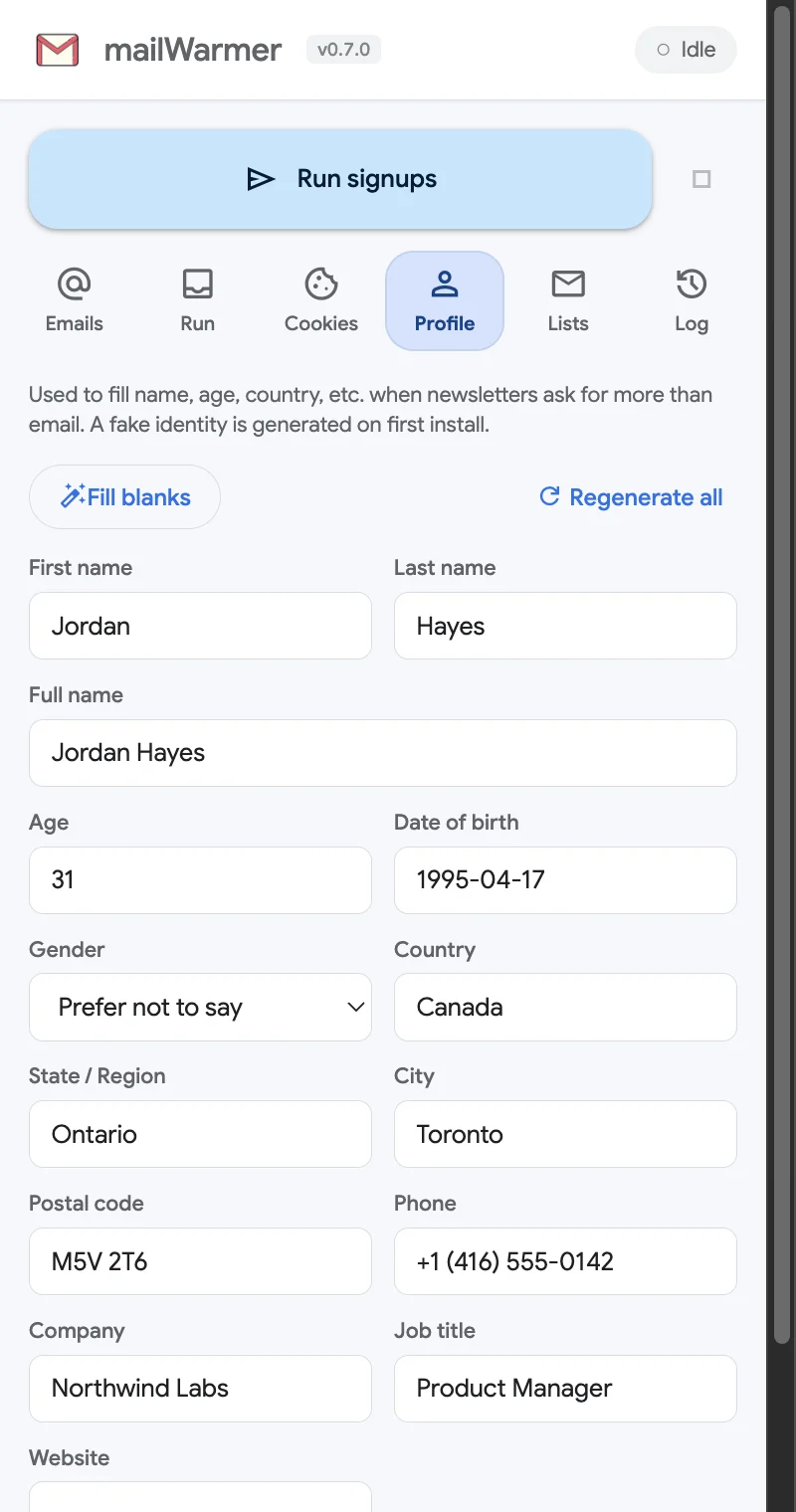
Some newsletter forms want more than an email: a first name, a country, sometimes a company or a job title. The Profile tab holds the details mailWarmer uses to fill those extra fields.
A ready-made identity
The first time you install mailWarmer it generates a believable, fictional profile, so form signups work out of the box. You don’t have to touch this tab. Change any field whenever you like.
The fields are: first name, last name, full name, age, date of birth (YYYY-MM-DD), gender, country, state / region, city, postal code, phone, company, job title and website.
Buttons
- Fill blanks — fills only the empty fields with generated values. Whatever you typed stays.
- Regenerate all — replaces the whole profile with a new fictional identity. It asks you to confirm first.
- Save profile — at the bottom of the form. Click it after editing; changes you don’t save are not used.
When it is used
Only on form newsletters (tag form), and only for the fields a form actually asks for. Substack signups only need the email.
Privacy
The profile lives in your browser’s local extension storage. It is only ever typed into the signup forms of the newsletters you run, and never sent to us.
Something missing or wrong? Open an issue.