Run
Step 2. Choose an address and newsletters, run the signups, and read every status as it changes.
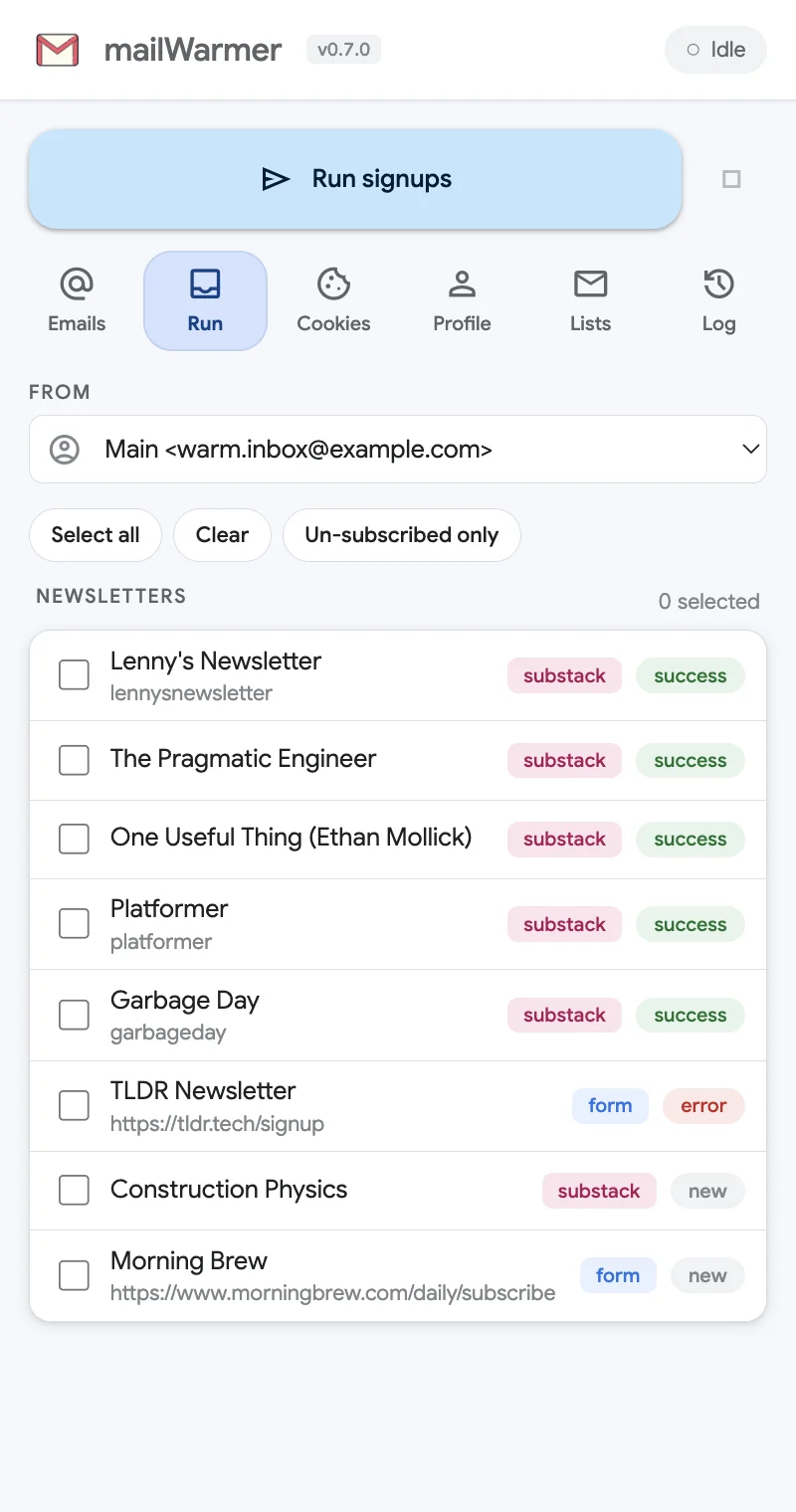
The Run tab is where the signups happen. It is step 2, right after you add an address on the Emails tab.
Choose the address
From lists the addresses from the Emails tab. The one selected here is the one this run subscribes. If the list is empty, the panel asks you to Add and select an email first.
Choose the newsletters
Tick the newsletters to subscribe. The counter above the list shows how many are selected. Three shortcuts sit above it:
- Select all — ticks every newsletter.
- Clear — unticks everything.
- Un-subscribed only — ticks only the newsletters the selected address isn’t subscribed to yet: everything that is new or failed last time. It is the quickest way to retry.
Run and stop
Click Run signups — the big button at the top of the panel. It is there on every tab, so you can start a run from anywhere once your selection is set.
The small square button next to it is Stop. It ends the run after the signup in progress. Everything that already finished keeps its status.
What happens during a run
mailWarmer works through your selection one newsletter at a time, waiting a random 2.5 to 5.5 seconds between signups so the activity looks human.
- Substack newsletters (tag substack) are subscribed through the newsletter’s own Substack signup — no tab opens.
- Form newsletters (tag form) open their signup page in a background tab. mailWarmer finds the email field (in the page or inside an embedded frame), fills it in — plus any extra fields from your Profile — submits, and closes the tab.
You can keep browsing while it works. Leave Chrome open until the run ends.
Statuses
| Status | What it means |
|---|---|
| new | Never run for this address. |
| pending | Selected and waiting its turn in this run. |
| running | Being subscribed right now. |
| success | The signup went through. |
| error | It failed. The Log has the reason; see also Troubleshooting. |
The toolbar badge
The mailWarmer icon shows progress at a glance, even with the side panel closed:
- Orange while a run is going — the number of successes so far.
- Green when it ends — the number of successful signups.
- Red when it ends with no success — the number of errors.
After the run
Open the inbox and confirm any “Confirm your subscription” emails. mailWarmer doesn’t read your inbox, so that click is yours — unconfirmed subscriptions never start sending.
Something missing or wrong? Open an issue.